Reviews & Appraisals Career path Multiple roles Signed approval Employee space

Simpler tracking of individual reviews

Your campaigns are prepared, filled in by several people and closed with an approval that stands as proof.

I want a demo
Your obligations

The legal framework has changed, and so have your templates

The professional review has given way to the career path review. Nicoka HRIS provides the matching templates, ready to use.

TEMPLATE 1

First review

TEMPLATE 2

Career path review

TEMPLATE 3

Mid-career

TEMPLATE 4

Eight-year summary assessment

TEMPLATE 5

End of career

Five standard “Career Path” templates provided with the solution. Use them as they are or adapt them to your practices.

Steps and roles

Several reviewers on the same step

A review rarely involves only two people. A step can now bring together several respondents, each with their own role, without duplicating the campaign.

  • Multiple reviewers and approvers, entered as tags from the campaign.
  • Role assignment managed from a dedicated window, editable during the campaign.
  • Each answer stays linked to its author’s role: you compare the manager’s view and the HR view side by side.
  • A participant added along the way, without starting from scratch.
Annual review campaignAnnual review · Camille BergerDesign engineer · held on 14 MarchCommand of the roleAutonomyTeamworkObjectives metProgressEmployee24 / 24Manager21 / 24HR approver18 / 2488% of reviews held
A review campaign: the scored form on one side, progress by role on the other.
What stands as proof

A review that holds up, the day you are asked for it

A mandatory review is only worth something if you can prove it took place, who led it and what was said. Three mechanisms take care of that.

A final approval that locks

An approval step closes the campaign. Answers are locked on the server side: nobody can alter them afterwards.

  • Approval record shown on screen as in the PDF
  • Signature visible on the final document
  • “Incomplete” status for reviews not finalised at closing

Electronic signature

From the campaign screen, reviews go out for electronic signature to the employee, through your usual provider.

  • Sent from the campaign, after the PDFs are generated
  • Your external signature provider
  • Document filed in the employee file

Archiving, with no manual handling

PDFs are generated and downloaded in bulk from the participants tab. What used to take an hour takes one click.

  • Bulk generation and download
  • Changed deadlines applied to participants in progress
  • Configurable email templates by review type
For employees

Everyone sees what they have to do, and when

Manual reminders disappear when people know for themselves what is expected of them.

The “My reviews” page

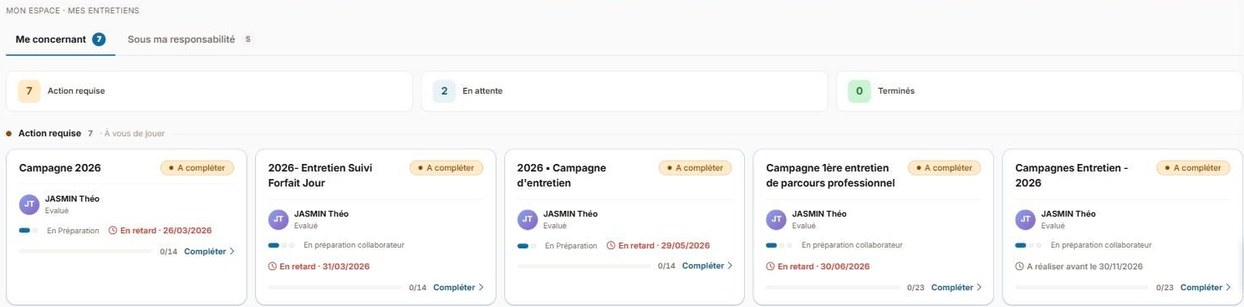
A personal space with two tabs, what I have to fill in as the person reviewed and what I have to review for others, sorted by urgency.

  • Reviewee and reviewer tabs
  • Sorting by urgency
  • History available online

360 on their own

Employees request the views that matter to them themselves, without going through the HR team for each request.

  • Respondents requested independently
  • Answers linked to their author’s role
  • Answers from previous steps visible

Group reminders

You remind every respondent still pending on a campaign in one go, instead of writing a message to each person.

  • All latecomers reminded at once
  • Progress measured step by step
  • Recovery page open to administrators
My reviews page: About me and Under my responsibility tabs, sorted by urgency
The “My reviews” page: what I have to fill in, what I have to review, and what is overdue.
Gains at every level

What everyone gains

Manager

  • Easy to get started with
  • Quick feedback, a shared view of objectives
  • Views compared with the other reviewers on the same step

HR

  • Campaign management and group reminders
  • Questionnaires adapted to your company culture
  • Proof of compliance with obligations, review by review

Employee

  • Their “My reviews” space, sorted by urgency
  • Intuitive form filling, better quality discussions on the day
  • Traceability and access to their past reviews

Frequently asked questions

More about the Reviews & Appraisals module

Can different processes be created depending on the type of review?
Yes. You customise the steps and assign the roles of your choice, to one or more people per step: review with the manager, input from the HR manager, final approval. Each type of review can follow its own path.
How do you identify the employees due for a career path review?
From the reviews by date dashboard, filter on the career path review to spot the people whose deadline is approaching. The five standard templates provided cover the complete career path, from the first review to the summary assessment.
Can reviews be signed electronically?
Yes. Once the PDFs have been generated in bulk from the campaign, reviews go out for electronic signature to the employee through your external provider. The final approval step locks the answers and shows the approval record on screen as in the document.
Is 360 feedback supported, and who requests the respondents?
Employees themselves request the people whose views they want to gather, without going through the HR team. Each answer stays linked to its author’s role, so you can compare points of view without mixing them up.
Can reviews be used to capture training needs?
Yes. A standard question, “Define training needs”, lets the employee and the manager enter needs, from the catalogue or as free text. This information feeds directly into the skills development plan, if you have the Training module.
What indicators are available for reviews?
Nicoka HRIS shows the progress of each campaign and the number of completed reviews. Since tracking indicators are specific to each company, you build your own with the built-in reporting tool.
In what format is the review archived?
It remains available online from the employee access. You can also generate the PDFs, in bulk from the participants tab, with automatic saving to the employee file.
See your own campaigns in Nicoka HRIS

Our teams take your review types, your steps and your roles, then run through a complete campaign, from preparation to signed approval.

I want a demo